Measure your body composition with the Galaxy Watch series
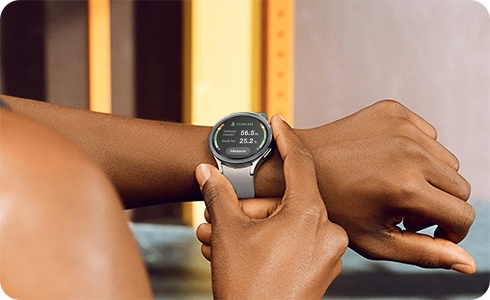
The Bioelectrical Impedance Analysis (or BIA) sensor on your new Galaxy Watch allows you to accurately measure your body composition! This includes details such as your body fat percentage, body water content, and skeletal muscle mass. You can review our guide to learn more about taking these measurements with your Galaxy Watch.
Notes:
- Make sure your Galaxy Watch has been updated to the latest software version. Measurements are intended for personal reference, general wellness, and fitness purposes only, and are not intended for use in the detection, diagnosis, or treatment of medical conditions or diseases. Please consult a medical professional for advice. Device screenshots and menus may vary depending on the software version, country, or region.
- The BIA function is available on the Galaxy Watch4 series, Galaxy Watch5 series, Galaxy Watch6 series.
- The BIA function may not be available in some countries.
Guide to use BIA sensors on Galaxy Watch
To ensure an appropriate experience and the optimal, safe, and responsible use of the technology, please take the following considerations into account regarding certain device features.
Pregnant Women: The device’s general features can be used regularly during pregnancy. However, it is not recommended to use the Body Composition (BIA) feature or to activate measurements related to body fat or muscle mass during this period.
Users with Pacemakers: To ensure your well-being and that of your medical devices, we recommend using all general and basic watch functions, such as time display, alarms, stopwatch, calendar, notifications, calls, messages, media control, and other everyday functions. However, it is recommended to avoid using the body composition (BIA) measurement feature to prevent interference with implanted medical devices.
People with Heart Conditions: The heart rate and electrocardiogram (ECG) measurement features are preventive and informative. Therefore, the information provided should not be used for self-diagnosis, making clinical decisions, or self-monitoring. In this regard, these features do not replace medical evaluations and medical diagnosies
Skin Sensitivity: To protect your skin and prevent irritation caused by friction, sweat, or contact with materials, we recommend cleaning and thoroughly drying the sensor and the strap when they are damp or after exercising.Galaxy Watch devices are designed to promote general well-being and track physical activity and healthy habits; however, they are not medical devices and do not replace evaluations, diagnoses, clinical monitoring, or treatments performed by healthcare professionals.
Bioelectrical Impedance Analysis
A Bioelectrical Impedance Analysis (BIA) sensor measures body composition, such as skeletal muscle and fat mass. This is done by sending microcurrents to the body to detect the amount of muscle, fat, and water. Your Galaxy Watch can take these measurements within a few seconds.
Measurement precautions and tips
Please be aware of the following conditions before measuring your body composition with your Galaxy Watch:
- It is recommended to measure in the morning before eating, as well as after using the bathroom.
- Do not measure if you have an implanted cardiac pacemaker, defibrillator, or other electronic medical device.
- Do not measure if you are pregnant.
- Do not measure if you are having your menstrual period.
- Because of growth spurts and significant changes in body composition during adolescence (under 20 years of age) measurement results may be less accurate.
- Measure before doing activities that may cause your body temperature to rise, such as exercising or showering.
- Remove metallic objects, such as jewelry, before measuring.
Additionally, please follow these tips when taking measurements:
- Wipe down the back of the watch to remove any oil or debris.
- Place both of your arms at chest level, so your armpits are not touching your torso.
- Keep your fingers placed on the Home and Back buttons and do not touch the other parts of your watch during the measurement.
- For accurate results, do not move during the measurement.
- Dry skin or body hair on your wrist can interfere with signal transmission, so apply moisturizing lotion to your skin or remove body hair before taking measurements.
Measure your body composition
Measuring your body composition with your Galaxy Watch is simple and takes a few moments to complete. Follow these steps to get started:
Note: You will need to enter your height and gender when measuring for the first time.


Step 1. Go to the Samsung Health app.
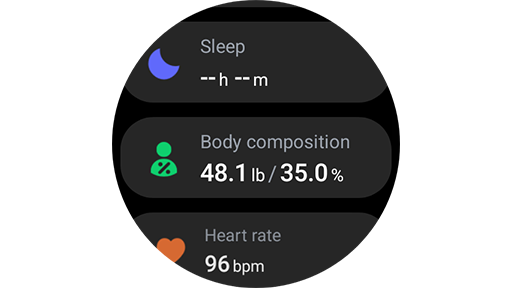
Step 2. Tap Body composition.


Step 3. Tap Measure.


Step 4. Enter your weight and tap Done.
To learn more about taking measurements, tap How to measure.


Step 5. Place your middle and ring fingers on the Home and Back buttons to begin the measurement. Follow the on-screen instructions.


Step 6. Wait a few moments for the measurement to finish. The body composition results will appear.
You can swipe up or down on the screen to view additional information.
For accurate results, we recommend using the same fingers every time to take measurements. Also, measurement results may vary depending on the strength, angle, presence of humidity/moisture, movement, etc. of the fingers placed on the Home button and the Back button.
Note: Please contact a Samsung service center if you are experiencing issues with taking measurements on your Galaxy Watch.


Service Centers


Locate the nearest Samsung service center to have your product checked.
Thank you for your feedback!
Please answer all questions.
Contact Info
WhatsApp
![WhatsApp]()
![WhatsApp]()


Monday to Sunday
8:00 a.m. a 12:00 a.m.
LiveChat
![LiveChat]()
![LiveChat]()


Monday to Sunday
8:00 a.m. a 12:00 a.m.