How to replace the battery in a Samsung SmartTag
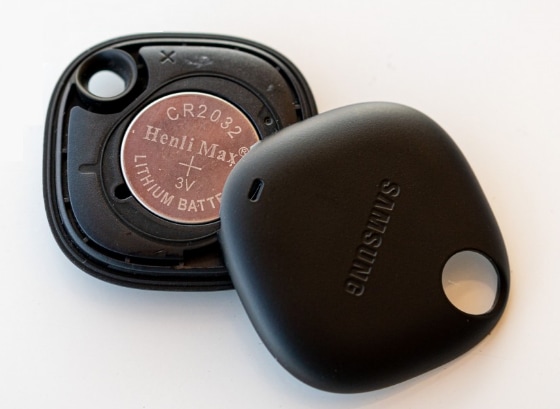
How to Replace the Battery in a Samsung SmartTag?
The Samsung SmartTag uses a CR2032 coin-shaped lithium battery that typically lasts up to a year depending on usage. If your SmartTag shows a low battery warning, follow these steps to replace the battery and restore full functionality.
1. How to Check the Battery Level
Before replacing the battery, check the current battery level through the SmartThings app:
- Open the SmartThings app on your Samsung Galaxy device.
- Select your SmartTag from the list of connected devices.
- Check the battery status displayed on the device information screen.
A low battery indicator means it's time to replace the battery.
2. How to Replace the Battery
Follow these steps to replace the battery in your Samsung SmartTag:
- Insert your fingertip or a flat object (such as a guitar pick or credit card) into the notch on the bottom of the SmartTag.
- Gently pry open the SmartTag case until it separates.
- Remove the old CR2032 battery from the compartment.
- Insert a new CR2032 battery with the positive (+) side facing up.
- Snap the cover back into place securely.
Ensure the battery is properly seated and the cover is tightly closed to maintain water resistance.
3. Additional Things to Check
After replacing the battery, verify the following:
- Confirm the new battery is correctly oriented with the positive (+) side facing up.
- Check that the SmartTag reconnects to your SmartThings app automatically.
- Test the SmartTag's tracking functionality to ensure it works as expected.
4. Supported Samsung SmartTag Models
This guide applies to all Samsung SmartTag models, including the original SmartTag, SmartTag+, and SmartTag2. Compatible devices work seamlessly across the Galaxy ecosystem.
5. Why the Battery Needs Replacement
The CR2032 battery in the SmartTag is non-rechargeable and designed for long-term use. Over time, battery capacity diminishes due to regular tracking usage, Bluetooth connectivity, and environmental factors. Replacing the battery ensures continuous tracking performance.
6. When the Battery May Not Last Longer
The battery life may decrease faster under the following conditions:
- Frequent location tracking or Find My Device usage.
- Prolonged exposure to extreme temperatures.
- Using the SmartTag in areas with poor Bluetooth or cellular signal.
Related Samsung Support Topics
Thank you for your feedback!
Please answer all questions.