What to do if Samsung washing machine stops during operation
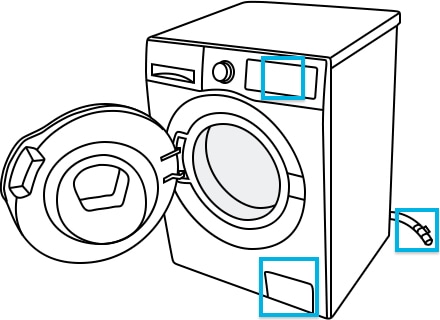
If your Samsung washing machine suddenly stops during operation, it's often due to safety mechanisms, power issues, or error codes. Follow these steps to troubleshoot and resolve the problem efficiently.
1. Why does my Samsung washing machine stop during operation?
The washing machine may stop for several reasons, including safety features, power interruptions, or error codes. Below are common causes and solutions:
2. Basic things to check first
- Ensure the door is fully closed and press and hold the Start/Pause button (Hold to Start).
- Verify the washing machine is receiving adequate power. If power is interrupted, the machine may pause temporarily and resume once power is restored.
- During cycles like wool drying or soaking, the machine may appear paused but is functioning normally.
- For front-load models, check if a coin or foreign object is lodged in the debris filter.
3. Other possible reasons for stopping
- Check if an error code appears on the control panel display.
- Ensure the debris filter is not clogged (front-load models only).
- Verify the drain hose is straight, unclogged, and not frozen.
- Note that the control panel design may vary by model, and instructions may differ slightly.
4. Common error codes and solutions
- SUD (Too many bubbles due to excessive detergent): Add a Rinse cycle to remove excess bubbles and use the correct amount of detergent.
- 5C/5E (Draining malfunction): Check the drain hose for kinks, freezing, or blockages. Clean the debris filter if clogged.
- UB/UE (Spinning does not work): Balance the load by redistributing items in the drum. Add towels if the load is too small and restart the Rinse/Spin cycle.
5. Additional things to check
- Clean the debris filter every 5–6 months to prevent clogs.
- Ensure the drain hose is installed at the correct height to avoid siphoning and reverse flow.
- If the drain hose freezes in winter, pour hot water into the machine to melt the ice. Repeat if necessary.
6. How to clean the debris filter
- Remove the cover on the bottom right side of the machine.
- Detach the debris cap and drain the water.
- Check for foreign objects and clean the filter thoroughly.
- Open the debris filter access cover using a coin or key.
- Place a towel under the cover to prevent water damage to the floor.
7. Supported Samsung washing machine models
These troubleshooting steps apply to most Samsung washing machines, including front-load and top-load models. For specific compatibility, refer to your product manual.
8. Related Samsung support topics
Thank you for your feedback!
Please answer all questions.